Showing posts with label Facebook Tricks. Show all posts

Tuesday, 29 May 2012

Post in all facebook groups with single click

4 Comments
Hey friends ...................

Today here post is about most intresting application realted to facebook
Using this now you can post in all facebook groups with single click ........


But my sincere request is to dont missuse this application to spam a lot

Uses of this application

1. You can promote your websites and blogs

2. You can promote your facebook fan pages

Follow the steps to post in all facebook facebook groups with single click

1. Click [ here ] to go to the site

2. Click on " FCONNECT " and connect to your facebook profile. After it all your facebook groups in which you are in will get displayed


4. Just open the below screen shot and follow the instruction


3. Click on "select all " or seclet any facebook group from displayed list

5. Click on share button at the below of the page.
Thats it your post get published in all groups with single click... :)


About the creative geniuss of this app creater

This app has been coded by the [ pushker yadav ] who is curently woriking on getting "Auto-facebook page liker" , "facebook status liking app", and "adding all friends to facebook group with single click".


Stay tuned for much more trick from him ..........


Read More

Sunday, 27 May 2012

Tips and tricks to get facebook page likes

Be The First To Comment
Hello friends after my posts on
1. How to get 1000 likes to your facebook status, photos, comments in 30 mins for free
2. How to add all your facebook friends with single click


As many of my visitors asked me on facebook about Geting likes to facebook pages,Today i thought to share few tips and tricks to get 100's of likes to your facebook pages.If i post all the tricks and tips then the post will be too long. so i decided to post it by divinding the post in to 3 parts


I. Genunine ways to increase likes to your facebook Pages
II. Black hat ( ingenuine) ways to boost your facebook likes
III. Usefull apps to turn your facebook page in a intresting manner
            
              I. Genunine ways to increase likes to your facebook Pages 


Read More

Friday, 11 May 2012

How to get 1000 likes to your facebook status, photos, comments in 30 mins for free

15 Comments
Hello friends....................

As i am busy with my exams i couldn't bring you the latest tricks
But my last post adding all friends to a facebook group with single click brought me many hits
hope your groups are filled  with lots of members now   :) :)


Today i am back with an intresting trick of
 " Getting 100's of likes to your facebook status in few minutes"

There are few sites which will provide likes to your status for money. but i found many sites which gives you likes for free
Check the screen shot of my status from above pic which brought me 1,300 + likes 
( i have only 850 frnz in my friends list )


Lets get started .........


1.   Most important part of this trick is all your settings should be open
i mean the content in your profile should be visible to everyone, or else this wont work
To do this goto privacy settings and change your settings to public
click on " How you connect " ( edit settings ) change all the three of them to every one
click on " Timeline and Tagging " (edti settings) and chnage them to " public" or " everyone "

Read More

Monday, 12 March 2012

Check whether your facebook account has been hacked

Be The First To Comment
Facebook users are increasing quite rapidly these days. At the same time facebook hackers are also increasing.
 Who knows someone may be reading your chat conversations, or may use your account to abuse others or to do illegal activites.......!! If someone hacked your accnout then i am sure that impact will be worse on you.....
Through this post you will come to know about, how to check whether your facebook account has been hacked or not.

Check your recent log in details
Facebook has this interesting feature which helps to you to know about recent login details, many other social networking sites don't have this feature. Here is how you can figure it out
1. Got to account settings.
2. Click on security
Read More

Friday, 24 February 2012

How to know friends who deleted you in facebook

2 Comments
I think many of us will be eager to know about friends who delelted you....
Now here is a site for you which allows you to know friends who deleted you .


 Follow the steps .
1. Clik here to go the website
2, Click on  " Login with  facebook "

Read More

Facebook chat tricks and tips

Be The First To Comment
Hello friends after my posts on " facebook status tricks " and "personalise your facebook timeline covers in creative manner" now here is post for you on facebook chat tricks excluive by TECH JAZZ

1.See friends who are in online from offline
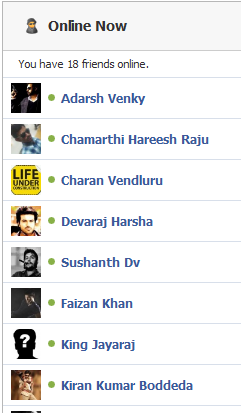
 When you are in offline in facebook you can not know who are in online. Online now is an app in facebook through which you can know who are in online though you are in offline.
Click here to get the app
2. Facebook chat list on your desktop

Read More

How to add facebook chat side bar to mosila firefox browser

Be The First To Comment
hello friends normally we use to surf on internet on  multiple tabs. It will be inconvenient to us to chat in facebook while browsing on other sites because each time we want to open facebook tab and chat there. but if we add facebook chat side bar to the browser we can chat from any tab as the side bar will wont change though we came out of facebook tab. You can see image bellow to know how it looks

Follow the steps bellow

1. Open mosila firefox browser and press alt key 
2. Select bookmarks and select "show all bookmarks "

Read More

Friday, 17 February 2012

Create your own facebook chat codes

Be The First To Comment
I have already done a post on all facebook smileys.
Now we are going to learn how to make our own facebook codes to use in facebook chat. This is quite simple actually, Using smileyti we can do it in few simple steps 

Steps to follow:-


Read More

personalise your facebook timeline covers in creative manner

Be The First To Comment
Facebook   releases new features Quite oftenly, which makes users  get attracted more towards them. Recent one was Timeline feature, Timeline is wider than your old profile, and it's a lot more visual. The first thing you'll notice is the giant photo  right at the top of your profile (Timeline cover).


In this post you will get to know about a few websites and apps that provides you cool 1.  Facebook covers,some great sites for finding interesting i
mages,and I’ve also got some tips on how you can put together a creative cover yourself.

1. Make collage of your photos as cover image


Read More

Thursday, 16 February 2012

Facebook status tricks

9 Comments

hello friends this is my first post in this blog so i have brought you some interesting stuff related to   facebook status. After a long search  for many days i have found some fabulous tricks regarding updating your
status in facebook. i think you will like each one of them...Have fun ... :)

1. Add dislike option to your status.
  Facebook has a like option for all updates of us. but using a app in facebook now we can ad
d dislikt option  for our status too. Not only dislike button you can add any option, its your wish how you name it. Click here to access that app.
2. Pre-Schedule your Status in Facebook

You can pre-schedule your status using this trick. let me tell you in deatil, using this trick
Read More

How to Pre-Schedule your status in facebook

2 Comments
Using this trick you can pre-schedule your status.
 let me tell you in deatial, using this trick you will just set date and time on which your status has to get updated on your wall and on that particular time your status will get updated automatically without asking for your permission. You can use this to whish your friends on facebook exactly on the time you wish to do it.

1. Click HERE to go the site
2. Click on facebook icon to login in to your accnout.


3. Set your time zone
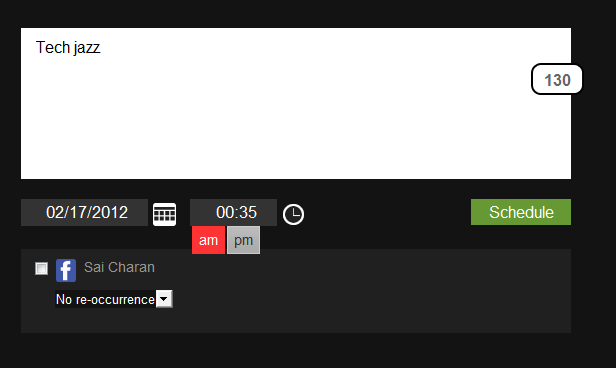
4.  Type your status and set time and date.....click on schedule
 5.  Your status will get updated on the exact time...
you can also set re-occurence in this so that the same status will get updated on multiple days you wish to be. you can aslo set many schedules

Read More
 

© 2012 Learn How To Hack - Designed by Sai charan You can contact him on Facebook | ToS | Privacy Policy | Sitemap

About Us | Contact Us | Write For Us